
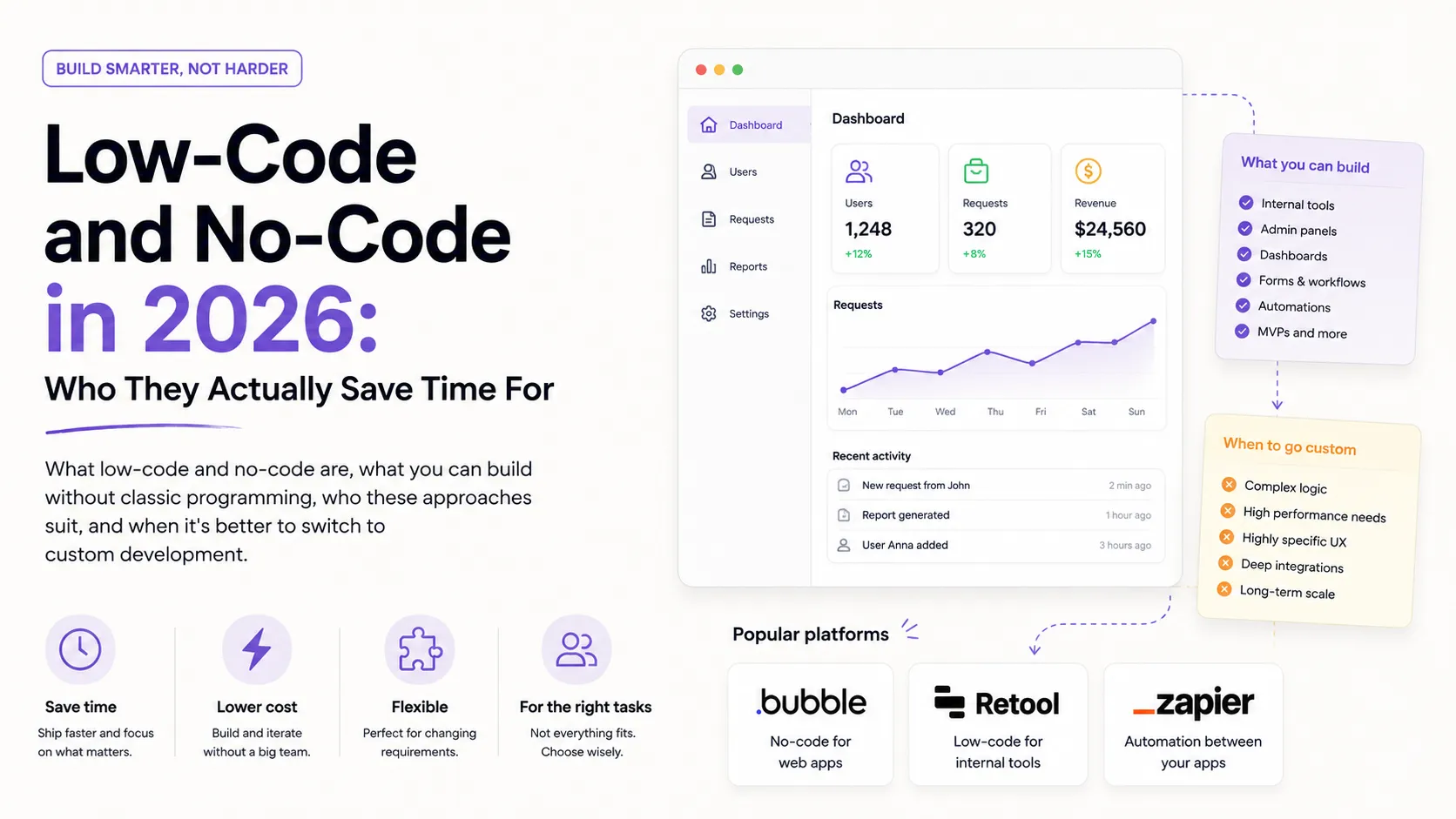
There are a lot of extremes around low-code and no-code: some say "it'll kill the developer profession," others "these are toys not worth attention." The truth, as usual, is in the middle. It's neither a replacement for programming nor a game — it's a tool for a specific class of tasks where it genuinely saves time and money. The only question is which tasks.
In this article we'll unpack what low-code and no-code are, what you can actually build without classic code, who these approaches suit, and — most importantly — when it's more advantageous to return to custom development. The topic complements vibe coding: that's about a fast AI-built MVP, this is about no-code platforms.
What Low-Code and No-Code Are
Both approaches reduce the amount of hand-written code, but differently:
- No-code — building an app with no code at all, in a visual builder: you drag blocks and configure logic with clicks. Aimed at people with no technical background.
- Low-code — mostly visual building, but with the ability to write code where flexibility is needed. Aimed more at technical people who want to move faster.
In plain words: no-code is "build without programming at all," low-code is "build fast, writing code only when needed."
What You Can Actually Build Without Classic Code
Modern platforms cover a few typical task classes:
- Simple web apps and landing pages — builders like Bubble let you assemble a full app with a database and logic without code.
- Internal tools and admin panels — Retool specializes in quickly assembling internal dashboards and panels on top of your data and APIs.
- Automations and integrations — Zapier connects services to each other ("new form submission → a row in a table → a chat message") with no code at all.
- Business applications — Microsoft Power Platform and Google AppSheet let you build corporate apps on top of the company's existing data.
The common thread across all these scenarios is tasks where launch speed matters more than a unique architecture.
Who It Actually Saves Time For
Low-code/no-code pays off first of all where classic development would be too slow or expensive:
- Businesses and non-technical teams — marketing, HR, and operations can build an internal tool or automation themselves without waiting in the developer queue.
- Early-stage startups — quickly validate an idea and launch a first version while there's no resource for a full team.
- Solo entrepreneurs — build a site, a form, a small service on their own.
- Developers — for internal tasks — even an experienced team wins by assembling an admin panel in Retool in a day instead of a week of custom work.
Notice: in every case the win is speed for a non-core task. That's the main criterion.
Strengths and Weaknesses
Like any tool, there's a clear balance here:
- Strengths: launch speed, a low barrier to entry, less routine, a cheaper start, less dependence on the developer queue.
- Weaknesses: limited flexibility (you do what the platform allows), a performance ceiling at scale, dependence on the vendor and its pricing, and migration difficulty when you outgrow the platform.
So it's a great start and a poor "forever" foundation for a complex product with unique requirements.
When to Switch to Custom Development
There are fairly clear signals that a platform is already holding you back:
- Logic more complex than the platform allows — you fight the tool more than it helps.
- Scale and performance — load has grown so that the platform can't keep up or becomes too expensive.
- Cost at scale — the monthly per-user/per-operation fee outgrows the cost of your own development.
- You need full control — over data, security, and integrations the platform doesn't provide.
A common strategy: start on no-code/low-code, validate the idea, and once the product "takes off," rewrite the critical parts custom. For the technical side of that transition, see the article on modern web development.
Low-Code + AI = a New Wave
In 2026 the line between no-code and "real" development blurs further because of AI. Tools increasingly generate an app from a text description, combining the simplicity of no-code with the flexibility of code. It's the same idea as in vibe coding: you direct the logic and requirements while the platform or agent handles the routine assembly. So the ability to work with such tools is becoming part of the baseline AI-era skill set.
Real-World Examples
A few typical tasks that in 2026 get done without classic code:
- An internal CRM for a small team — Retool or AppSheet on top of an existing spreadsheet instead of months of development and a separate dashboard.
- Lead automation — a form on the site → Zapier → a record in the CRM and a chat notification, with no line of code.
- A landing page with logic — Bubble for capturing leads and simple calculations when a business-card builder is no longer enough but full development is still too early.
The common thread across all the examples: these are secondary-but-needed business tools where launch speed matters more than the uniqueness of the solution. That's exactly where low-code/no-code pays off fastest.
How to Choose a Platform
There are many tools, and a wrong choice costs migration time. Focus on a few criteria:
- Fit for the task. There's no "best" platform in general — there's a best one for a specific task. For internal dashboards — Retool; for automations between services — Zapier; for a client-facing web app — Bubble; for corporate apps on top of company data — Power Platform or AppSheet.
- Export and lock-in. How easily can you take your data and leave? The deeper the platform holds your logic in its own format, the more expensive it is to "move out."
- Pricing model. Per user, per operation, or per app — this critically affects cost as you grow.
- Integrations. Does the platform connect to the services you already need (CRM, payments, analytics) without hacks?
- Flexibility ceiling. Can you write code (low-code) when the visual builder is no longer enough?
Tip: before building anything serious, assemble a small trial app and test the platform on your real task — that's faster than reading comparisons.
What It Costs
The main trap of low-code/no-code is deceptive cheapness at the start. A free or cheap tier is great for a prototype, but the cost usually grows with scale: more users, more operations, more apps — a higher fee. At some point the monthly subscription can exceed the cost of your own development.
So count not only "what it costs now" but "what it will cost when we're 10× bigger." For short-term idea validation or a small internal tool, the savings are almost always on the no-code side. For a product that plans to grow seriously, it's worth planning a path to custom development in advance.
No-Code as a Career Path
Low-code/no-code isn't only a tool for "non-programmers" — it's also a distinct professional niche. There's demand for specialists who build sites, internal tools, and automations for clients on these platforms — fast and cheaper than classic development.
For a beginner developer it can be a good entry point: you learn to think in products and data, gather real cases for your portfolio, and master classic code in parallel. For an experienced one, it's a way to quickly close non-core tasks and not spend expensive time on routine. Either way, it complements rather than replaces the fundamentals: understanding data, logic, and UX makes you stronger both in no-code and beyond it.
Example: Lead Automation Without Code
To see how this works in practice, take a typical business task: handling leads from a website. Classic development would take days, but on no-code it's assembled in an hour:
- Trigger. A new submission in the site form (or a new row in a table).
- Action 1. Zapier automatically creates a card in the CRM with the client's data.
- Action 2. Sends a notification to the manager in chat or by email.
- Action 3. Adds a row to a table for analytics and statistics.
Not a single line of code — just a visual connection of services. Tasks like these (routine, typical, at the intersection of several tools) are the ideal niche for no-code. And when the logic gets more complex — say, you need non-standard processing or a large volume — that's when you bring in custom development. We wrote about the technical side of integrations in the article on modern web development.
Common Myths About No-Code
There's a lot of exaggeration around the topic in both directions. Let's sort out the most common myths.
- "No-code isn't serious." In reality, real businesses run on these platforms and launch products that make money. What's not serious is using no-code where custom development is needed — and vice versa.
- "It's completely code-free, so you don't need to know anything." To build anything more complex than a landing page, you still need product thinking: data structure, logic, UX. No-code removes syntax, not the need to think.
- "No-code is always cheaper." At the start — yes; at scale — often not. Monthly fees per user or operation can outgrow the cost of your own development, so count ahead.
- "If you start on no-code, you're stuck forever." Not necessarily. The smart strategy is to start fast, validate the idea, and rewrite the critical parts custom if needed.
- "No-code will kill developers." It takes over the routine and simple tasks, but complex products with unique logic, scale, and security still need engineers.
A healthy view is simple: no-code is neither magic nor a toy but a tool with a clear zone of application. Those who understand that zone save time; those who ignore the limits pay for it in rework.
How to Start with No-Code Over a Weekend
The best way to understand no-code is not to read comparisons but to build something small yourself. Here's a weekend plan:
- Pick a real small task. Not an abstract one but your own: a signup form, an expense tracker, a simple admin panel for an existing spreadsheet.
- Match the tool to the task type. Automation between services — Zapier; an internal dashboard — Retool; a client-facing app — Bubble; a business app on top of data — Power Platform or AppSheet.
- Build the minimal version. Only what solves the task, no "let's add one more feature." The goal is to reach a working state, not perfection.
- Connect data for real. A real spreadsheet or database instead of "filler for looks" — that's how you'll see the platform's true limits.
- Try to "break" it. Empty fields, many records, weird data — where does the platform stumble?
In two days you'll learn more about no-code than from a dozen reviews, and you'll have your first portfolio case. Most importantly, you'll feel first-hand where the platform saves time and where it starts to get in the way. That sense of the limits is exactly what separates someone who uses no-code deliberately from someone who gets stuck on the first non-standard requirement.
The Short Version
If you compress the article into a few points:
- No-code is building with no code; low-code is mostly visual but with the option to write code.
- Ideal for landing pages, internal tools, automations, and business apps.
- The main win is speed for a non-core task, not a unique architecture.
- The weak spots are flexibility, a scale ceiling, cost at scale, and vendor lock-in.
- A common strategy: start on no-code, validate the idea, and rewrite the critical parts custom.
- No-code isn't "instead of code" but "faster where code is overkill"; the foundation of understanding data, logic, and UX stays key either way.
FAQ
Will no-code kill the developer profession?
No. It takes over simple, typical tasks, but complex products with unique logic, scale, and security still need engineers. What changes is the distribution: routine goes to platforms, the complex stays with developers.
Should a beginner choose no-code or learn to code?
It depends on the goal. To quickly build a specific product — no-code. To build a career in development — learn to code and use no-code as an accelerator. One doesn't exclude the other.
Can you make money with no-code?
Yes. There's a whole market of specialists who build sites, internal tools, and automations for clients on these platforms. It's a separate, fully monetized niche.
Can I combine no-code with classic code?
Yes, and it's a common practice. Low-code platforms let you write code where flexibility is lacking, and no-code parts (for example, automations or an admin panel) can stay around a custom core. This hybrid approach is often optimal: speed where you can, control where you must.
What to Show in Your Portfolio
No-code/low-code projects are worth a portfolio too — if you show the business result: which task you solved, how much time you saved, what you automated. A client cares about the effect, not whether you wrote the code by hand. How to frame such a case is in the guide How to Make a Portfolio.
Add the relevant skills and tools to your profile, tag your project technologies, and see how other specialists present their work.
Ready to act?
- Create your own portfolio: https://searchtalent.dev/en/projects/new
- Skill and technology directory: https://searchtalent.dev/en/talents/skill
- Browse other specialists' projects: https://searchtalent.dev/en/projects
- More articles: https://searchtalent.dev/en/articles