
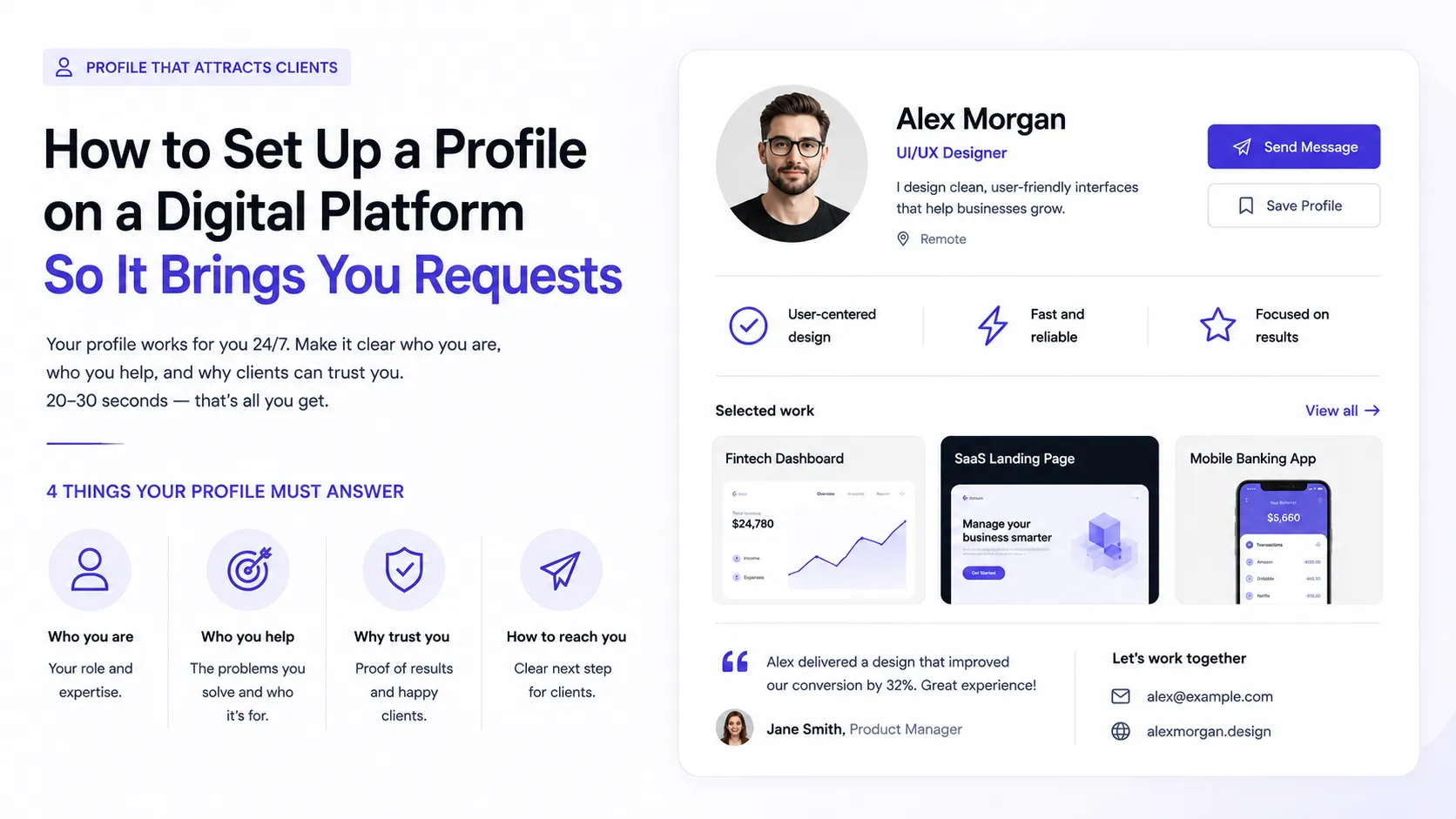
Most specialists treat their profile as a form: filled it in at signup, ticked the box, went back to hunting for work by hand. In reality the profile is the one asset that works while you sleep. Someone finds you through search, a skill facet or a link from someone else's project, spends 20–30 seconds, and decides: message you or close the tab.
Those 20–30 seconds are your entire funnel. So the question is not "is the profile filled in" but whether it answers three things at once: who you are, who you are useful to, and why you can be trusted. Below is a breakdown by element, in the order people actually read them.
How Profiles Are Really Read
Nobody reads a profile top to bottom. The scan looks roughly like this:
- Photo and headline — one second. First impression forms: "my kind of person / not my kind of person."
- Work samples — five to ten seconds. Eyes jump across previews looking for something resembling their own task.
- The bio — read only if the first two steps landed.
- Skills, reviews, rating — this is verification, not introduction: the person is confirming a decision they have nearly made.
- Contact — if it is not visible within a second, some people simply leave.
Hence the key conclusion: the most important things belong at the top and in the visual part. The most brilliant text about yourself at the bottom of the profile will be read by someone who was already going to message you.
A profile does not persuade. A profile removes doubt. The client arrives with one question — "will this person solve my problem" — and your job is to make the answer obvious before doubt has time to set in.
Photo: A Human Face, Not a Logo
The cheapest way to raise trust is a proper photo. Not a logo, not a game avatar, not a meme, not an empty circle with initials.
What works:
- The face is visible and in focus. A head-and-shoulders portrait, eyes toward the camera.
- A neutral background — a wall, a street, a workspace. It just must not steal attention.
- Natural light and a relaxed expression. A phone shot by a window beats a dark selfie from a party.
- The same photo everywhere. One frame across your profile, messengers and other platforms — recognition at zero cost.
What does not work: group photos (which one are you?), sunglasses, artistic shots where the face is barely visible, and AI-generated portraits. The last one is spotted quickly and backfires: someone who won't show a real face automatically raises questions.
Headline: The Most Important Line in the Profile
Everyone reads the headline — in the profile, in the catalog, in search results. It is the one element that can work even when nobody opens your profile at all.
The classic mistake is putting a job title there: "Frontend Developer," "Designer," "Video Editor." That is a category, not a headline. Such lines do not distinguish you from a hundred other people in the same list.
The working formula has three parts:
[Who you are] for [whom] — [what outcome / what makes it specific]
Compare:
❌ "UI/UX designer"
✅ "UI/UX designer for SaaS interfaces — from research to a design system"
❌ "Frontend developer"
✅ "React frontend developer — online stores and customer dashboards"
❌ "Video editor"
✅ "Short-form editor for Reels and TikTok — packaging expert content"
A few rules:
- The keyword must appear literally. If people search for "designer," the word "designer" belongs in the headline. Search engines are less generous with synonyms than you would like.
- A niche beats breadth. "I do everything" reads as "I do nothing in particular."
- No slogans. "I create magic," "design that inspires," "turning ideas into reality" are empty slots that communicate nothing about your specialization.
The Bio: Four Paragraphs That Do All the Work
Nobody finishes a long bio, and an empty one adds nothing. A working length is roughly 600–1200 characters split into four short blocks.
Paragraph 1 — who you are and what you do. One or two sentences that echo and expand the headline, using the words people search with.
Paragraph 2 — the problems people come to you with. The strongest part of the bio and the one most often skipped. A client is not shopping for "a designer" — they are looking for a fix: "the site looks dated," "we have an app but nobody uses it," "we need 20 clips a month and have no time."
When someone sees their own situation described in their own words, they assume you have already handled that exact case.
Paragraph 3 — how you work. Briefly: the stages, how long things usually take, how you hand over results, how revisions work. This defuses the client's real fear — not "can you do it" but "will working with you be painful."
Paragraph 4 — a call to action. One line: what to do next and what to expect. "Send a short description of the task — I reply within a day and tell you honestly whether I can help" beats "open to offers."
What if I'm just starting and have nothing to back up "the problems people come to me with"?
Write about the direction you work in rather than past clients: "I take landing page and small website builds," "I edit short-form video for social media." That is honest and still concrete. The one thing to avoid is inventing clients and numbers: a single follow-up question in conversation exposes it instantly and kills the deal for good. How to demonstrate your level without commercial work is covered in How to build a portfolio with no experience.
Services: Turn Skills Into Something Orderable
"Design," "development," "editing" are categories, not services. You cannot order "design" any more than you can order "medicine."
A service becomes orderable when it has boundaries and an outcome:
- ❌ "Web design" → ✅ "Landing page design: wireframe, desktop and mobile mockups, handoff to development"
- ❌ "Development" → ✅ "Figma mockup to responsive code"
- ❌ "Video editing" → ✅ "A package of 8 vertical clips per month with captions and covers"
Three or four clearly described services work better than a long list of everything you could theoretically do. And separately: do not write "full service, end to end" unless you are genuinely ready to own the whole cycle — it creates expectations you will have to answer for.
Skills and Keywords: How People Actually Find You
A profile is not only a page for a human — it is a record that feeds internal search and facet listings by skill and role. Your skill set directly determines how many lists you appear in at all.
Practical rules:
- Name skills the way people search for them. Not "proficient with design tools" but specifically:
Figma,React,Premiere Pro,Next.js. Exact names are what filters run on. - Five honest ones beat thirty for volume. A long list blurs positioning: nobody can tell what is your core craft and what you saw once.
- Do not mix levels. If you are a frontend developer who once touched backend, do not list them side by side — or you will get requests you have to decline.
- Update after every project. New technology in your work means a new skill in the profile that same week, while it is fresh.
- Keywords belong in the text too. Search reads descriptions as well, so your specialization should appear naturally in prose, not only in the tag list.
To see which skills exist in the system and how others phrase them, browse the skills catalog, and tag your work with project tags — that is the second channel people use to reach you.
Work Samples: The First Three Decide Everything
Work previews are what people look at right after the headline. And they usually look at the first three or four; few scroll further.
- Put the most typical work first, not the newest. Lead with the pieces closest to the work you want to be hired for. A profile sets expectations: show three illustrations and you will get illustration requests, even if you wanted interface design work.
- The cover matters more than the contents. A weak cover means nobody opens the case at all. One legible frame, no small type that disappears in a list.
- Every piece needs a description. Work without explanation shows the result but not the thinking. The "task → what I did → outcome" structure turns a picture into a case study. Covered in detail in How to make a portfolio.
- Fewer but finished. Three complete cases beat ten half-empty cards: empty cards read as carelessness and drag down the strong work around them.
Social Proof: What You Cannot Say About Yourself
Everything you say about yourself is discounted for self-interest. So elements that confirm your claims from outside carry more weight than any text:
- Reviews — even one or two. The valuable ones name a specific task rather than saying "great work, thanks."
- Rating and activity — a signal that the profile is alive, not abandoned two years ago.
- Badges and achievements — a fast visual marker that reads without reading.
- Public expertise — articles, comments, answers to others. It shows how you think before the first conversation.
The simplest way to collect the first signals is not to wait for them: ask for a review after a finished project (even a study or pro bono one), answer questions in the feed, leave substantive comments on other people's work.
Contacts and Action: Do Not Make People Hunt
The classic loss: someone looked at the profile, liked everything — and could not find how to reach you. Or found it, but had no idea how to open the message.
- The contact method should be visible without scrolling and without signing up for three services.
- Tell them what to do next. "Describe the task and add a link to your project" is an instruction that is easy to follow.
- State availability honestly. "Currently booked, taking projects from next month" does not scare people off — it reads as demand. Silence in response to an inquiry damages reputation faster than anything else.
- Do not list ten channels. One or two that you genuinely read.
The Profile as an SEO Object
A platform profile is a page search engines index and, at the same time, a record that enters internal listings by skill, role and tag. That means people can reach you two ways: external search and in-platform navigation.
What helps both:
- A concrete specialization in the headline — that is what appears in results and lists.
- Filled-in skills and role — otherwise you appear in no facet at all.
- Tags on your work — every tag is one more list you exist in.
- A live profile — regular updates and new work beat a one-time perfect fill.
The logic mirrors writing for search: specific beats generic. Broader context is in the article on SEO for AI search.
Checklist: Walk Through Your Own Profile
- Photo is real, the face is visible, the background does not interfere.
- The headline states a specialization, not just a job title.
- The headline contains the word people will search with.
- The bio includes a "problems people come to me with" paragraph.
- You describe how you work: stages, timelines, revisions.
- There is an explicit call to action explaining what to write.
- Services have boundaries and a clear outcome.
- Skills are specific and honest, with no padding.
- The first three work samples resemble the jobs you want.
- Every piece has a description, not just an image.
- There is at least one external trust signal: a review, an article, activity.
- The contact is visible within seconds.
If the checklist leaves you wanting to rewrite things, that is normal. A profile that generates requests almost never comes out right on the first try.
Common Mistakes
- A profile that is a résumé. A chronology of employers instead of an answer to "what will you do for me."
- An empty bio, or three words. It reads as "I don't care" — and is received exactly that way.
- Clichés instead of facts. "Responsible, communicative, fast learner" says nothing: everyone writes it.
- Positioning that is too broad. "Design, development, social media, copywriting, video" reads not as versatility but as an absence of specialization.
- Dead links. A broken link damages trust more than no link at all.
- A profile with no work. The single biggest reason profiles generate no requests — and the easiest to fix.
- Fill once, forget forever. A profile last updated two years ago reads as abandoned.
- Invented numbers and imaginary clients. Never pays off: one line of conversation exposes it.
Key Takeaways
- Profiles are scanned in 20–30 seconds, not read in order — the important parts belong at the top.
- The "who → for whom → what outcome" headline matters more than all the rest of the text.
- The strongest part of a bio is the list of problems people bring you, phrased in the client's words.
- A service has boundaries and an outcome; a category ("design") is not a service.
- Skills determine how many listings and filters you show up in at all.
- The first three work samples set expectations — lead with what you want more of.
- Social proof outweighs self-description; the contact must be visible immediately.
- A profile is a living document, updated after every project.
FAQ
How many work samples should a profile have?
Three or four properly written pieces with descriptions work better than ten cards with no explanation. Empty cards drag down the strong work because they read as carelessness. What matters is not the count but how closely the first pieces resemble the work you want to be hired for.
What do I write if I have no commercial experience?
Write about the direction and the type of tasks you take, without invented clients or numbers. Instead of commercial cases, show study and personal projects with the process explained: task, decision, outcome. An honest beginner profile with three finished pieces generates more requests than one full of vague hints at experience that does not exist.
Should I list prices in my profile?
Not mandatory, but a range or a minimum budget saves both sides time and filters out irrelevant inquiries. If you are not ready to name figures, explain what the price depends on — scope, timeline, number of screens or clips. Staying silent about money usually means more conversations that go nowhere.
How often should I update my profile?
After every finished project or newly learned skill — that rhythm keeps the profile from going stale. At minimum, review the headline, bio and work order once a quarter: specialization drifts faster than it feels.
Where to Start Right Now
Open your profile and read it as someone seeing you for the first time with 30 seconds to spare. If after those 30 seconds it is unclear what problem you can be hired for, start with the headline and bio — that gives the biggest effect for the least time.
Then the work: add a description to every piece and move the ones resembling your desired jobs to the front. Look at how other specialists present themselves in the talent catalog and use the best phrasing as a reference — faster than inventing from scratch.
Ready to act?
- Update your profile and add a project: https://searchtalent.dev/en/projects/new
- Talent catalog — see how others do it: https://searchtalent.dev/en/talents
- Skills and technologies catalog: https://searchtalent.dev/en/talents/skill
- More articles: https://searchtalent.dev/en/articles